A lean stack,
built for editors
and AI agents.
A redesigned NUS Enterprise website — hundreds of pages across a handful of departments. Clean, modern, WordPress-powered CMS, AI-enriched metadata, and fast full-text search built from the site's own content. Off-the-shelf where possible, custom only where the product requires it.
Analysis
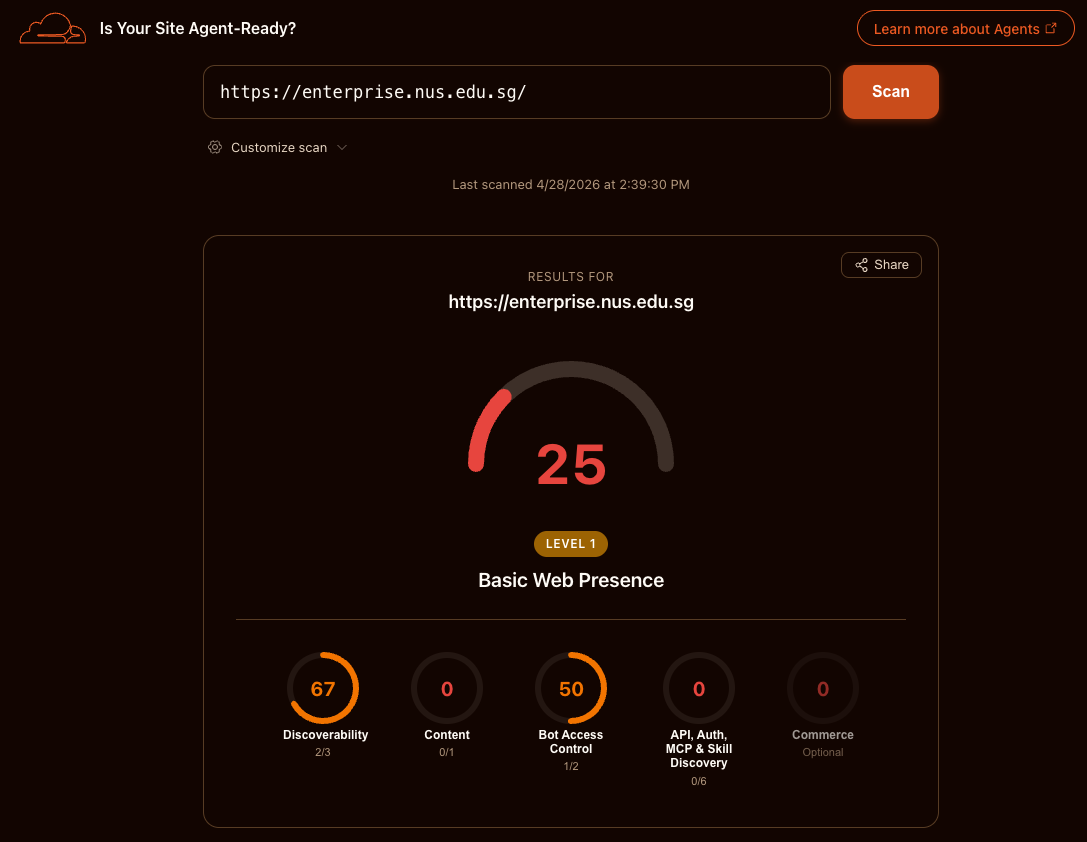
The NUS Enterprise website has served its audience for over a decade. In that time, content has grown to 7,300 unique URLs serving ~35k monthly pageviews — roughly five views per URL. The WordPress stack that underpins it has grown with the content: theme, page builder, slider, jQuery, and a dozen plugins now load 101 HTTP requests and 13.3 MB per homepage visit. A Lighthouse audit (April 2026) scores performance at 68/100; a Cloudflare agent-readiness scan the same month scores 25/100 — the site has a valid sitemap but no support for markdown content negotiation, AI bot rules, or emerging agent discovery standards.
These figures are not surprising for a site of this vintage. They tell us where the starting line is. Increasingly, people will encounter NUS Enterprise content not through browsers but through AI agents acting on their behalf — the site needs to speak that protocol natively. Building on what works well today — the content, the editorial team, the audience — the redesign will deliver a platform that academic staff can operate without technical help, that makes content accessible to both humans and AI systems, and that requires no engineering maintenance for three years after launch. The rest of this document describes how.
Overview
The brief calls for a content-first site that academic staff can edit without technical help, that automatically enriches content with structured metadata for both humans and AI agents, and that surfaces the right answer fast — both to people searching the site and to AI agents fetching content on a user's behalf. The stack below is the smallest set of pieces that delivers all three without locking NUS into anything heavy to maintain.
Stack at a Glance
| Layer | Choice |
|---|---|
| Frontend | Astro + Tailwind CSS |
| CMS | WordPress (headless) |
| Search | Transformers.js (semantic) + Pagefind (keyword fallback) — both client-side |
| Analytics | Reuse existing (confirm with client) or Plausible |
| Frontend hosting | Cloudflare Workers |
| AI Sidecar | Cloudflare Workers — enrichment + chat endpoint |
| AI model | Google Gemini |
Architecture
Key data flows
- Content delivery WordPress pushes content on publish via webhook, triggering an Astro build or ISR revalidation. Static pages are served from the CDN edge — no origin hit for regular page loads.
- AI content enrichment On publish, the AI Sidecar automatically generates structured metadata — meta descriptions, Open Graph tags, JSON-LD markup, and canonical question/answer pairs — and writes them back to the CMS. No manual input from editors.
- Search Search uses a two-tier client-side approach. Pagefind provides instant keyword results from a static full-text index — no download, works immediately. Transformers.js layers semantic understanding on top once the 23MB model downloads (~2-3s): queries are embedded and re-ranked by cosine similarity against pre-computed embeddings. Personalised pages use the same embeddings for block retrieval. Detail in §8.2.
- Index refresh Both indexes are rebuilt at deploy time: Pagefind crawls rendered pages for the keyword index, sentence-transformers generates embeddings for the semantic index. Content publishes refresh both on the next deploy. No separate ingest pipeline or external service.
- Personalised pages A visitor's stated intent is embedded and matched against the static embeddings index, with top blocks assembled client-side into a coherent, shareable page. Four pre-built archetype pages cover the most common visitor segments as instant-load static HTML. Deterministic slotting of real published content, no model in the request path. Detail in §8.2.
- Conversational assistant A chat widget backed by the same Sidecar service and Gemini API. Visitor messages are matched against the embeddings index (RAG), and the LLM generates grounded answers citing specific content blocks. Detail in §8.5.
-
AI agent content
Crawlers requesting
Accept: text/markdownhit the same URLs, served markdown by the Astro middleware or edge function. No origin logic beyond content negotiation.
Frontend — Astro
Astro is a JS framework for content-driven websites — it renders on the server and ships lightweight HTML with zero unnecessary JavaScript. Content-first, outputs minimal JS by default, and partial hydration means interactive components only ship JS where needed.
- Styling
- Tailwind CSS
- Components
- shadcn/ui or a lightweight custom set — to be decided once design direction is clearer
- Rendering
- Static generation for the bulk of the site; ISR for pages that update frequently (news, events)
- Hosting
- Cloudflare Workers — Singapore PoPs
- Accessibility
- WCAG 2.1 AA compliance assumed — needs formal confirmation with client
5.1 Caching
- Static pages: long
Cache-Controlheaders (e.g.,s-maxage=86400, stale-while-revalidate). Content changes trigger revalidation via webhook rather than TTL expiry. - Search indexes: both the Pagefind index and embeddings JSON ship as static assets, so they cache at the edge with the same long TTL as the rest of the build and are invalidated on redeploy. No search API to rate-limit or cache separately.
- Custom cache logic: any invalidation beyond what the CDN handles natively goes through CDN cache headers. Avoid custom in-app cache logic — it creates consistency issues.
5.2 Deployment
- Git-based workflow (GitHub/GitLab), PR previews via CF branch deployments
- WordPress publish webhook triggers a production build/revalidation
- Environment secrets managed via the hosting provider's secrets store — not in committed
.envfiles - Staging environment mirrors production, built from the WordPress staging content
5.3 Analytics
If the client has existing analytics (Google Analytics or similar), reuse and confirm the setup during onboarding. If starting fresh, Plausible is the recommended default — lightweight, privacy-friendly, no cookie banner required, which is cleaner for an academic institution.
5.4 Domain migration scope
Migration work needed to preserve search equity: URL mapping, permanent 301 redirects, canonical updates, sitemap submission, and post-launch monitoring in Search Console. We will also keep the destination pages aligned to the intent of the old URLs so external links continue to resolve cleanly.
CMS — WordPress
6.1 Why WordPress
WordPress was chosen primarily for its built-in SSO capabilities and data residency flexibility — both hard requirements for NUS Enterprise. As a self-hosted, open-source platform, WordPress gives NUS full control over where data lives and how authentication integrates with existing identity providers. The editorial team's familiarity with WordPress from the current site means zero retraining on content management fundamentals.
SSO and data residency were the deciding factors. Hosted SaaS solutions couldn't meet the residency requirements; self-hosted alternatives like Sanity could technically work but lack the mature SSO plugin ecosystem WordPress has. The headless approach combines these institutional advantages with the performance benefits of a static frontend while keeping the familiar editing experience.
| Capability | WordPress (headless) |
|---|---|
| Editorial UX | Good Familiar block editor, widely known by academic staff |
| Custom AI in editor | Moderate Via plugin or sidebar integration |
| Approval workflows | Plugins Mature third-party options (PublishPress, etc.) |
| SSO | Plugins SAML/OAuth via existing plugins |
| Multilingual | Plugins WPML, Polylang, or similar |
| Licensing cost | Free Open source |
| Maintenance burden | Medium Regular updates for core, themes, and plugins |
| Hosting flexibility | Full control Self-hosted or managed hosting |
6.2 Content model
Content types are defined as custom post types and ACF (Advanced Custom Fields) field groups. The shape of each content type needs to be agreed with faculty stakeholders before CMS configuration begins. Content is mostly text and images — a short workshop with department reps is usually enough. Typical content types:
- Pages (general, flexible layout)
- People (faculty bios, staff profiles)
- News and announcements
- Events
- Research outputs and publications
- Departments / organisational units
- FAQ pages — question-answer pairs targeting queries AI systems get asked
- Comparison pages — side-by-side program content
6.3 Approval workflow
Content coordination and approval happen outside the CMS — NUS Enterprise uses Monday.com and Google Workspace to drive their workflow processes. WordPress handles publication only. The editorial team drafts and reviews content in their existing tools; once approved, content is published to WordPress. WordPress's built-in revision system provides full edit history and rollback capability for what lands in the CMS.
| Role | Permissions |
|---|---|
| Editor | Draft and edit within own department |
| Head of Department | Review and approve department content |
| Web Admin | Full access across all departments |
6.4 SSO
SSO via SAML or OAuth2 is supported through established WordPress plugins (e.g., miniOrange SAML, OneLogin). Can be configured post-launch when NUS IT provides the identity provider details.
6.5 Maintenance
WordPress requires regular maintenance: core updates, plugin updates, theme updates, and security patches. This is the tradeoff compared to a hosted SaaS CMS. A managed WordPress host (e.g., Cloudways, Kinsta) can automate much of this, reducing the burden to near-zero for the editorial team. The maintenance schedule should be documented and assigned to a responsible party before launch.
AI Layer
7.1 Google Gemini
Google Gemini is the chosen LLM provider. The AI Sidecar calls the Gemini API for all content-generation and assistance tasks. Gemini handles long-form structured writing well and follows complex instructions reliably, which matters when enforcing institutional tone or department-specific constraints via the system prompt.
7.2 AI Sidecar service
A small Node or Python service sitting between the CMS and the Gemini API. Responsibilities:
- Content enrichment: on publish, automatically generates meta descriptions, Open Graph tags, JSON-LD structured data, and AEO question/answer pairs from the published content — no editor intervention required
- Prompt management: maintains enrichment prompts per content type (pages, events, people, etc.)
- Content management: markdown as a secondary representation. Sidecar writes
.mdsnapshots for easier manipulation with AI agents and future reuse.
The Sidecar is intentionally decoupled. New enrichment features — automated tagging, summarisation, translation, accessibility checks — get added here without touching the CMS or frontend. If the client wants more ambitious features later, the Sidecar is the foundation for that.
7.3 Search
Search is a two-tier client-side system. Pagefind provides instant keyword results from a static index — zero download, works on first page load. Transformers.js layers semantic understanding on top once the model downloads (~23MB, once per session). No search server, no per-query costs, no external dependencies. Full detail in §08.
7.4 Content negotiation (Markdown for AI agents)
End-users will increasingly encounter content through AI agents, not browsers. All pages serve clean markdown
when an Accept: text/markdown header is present. Browsers get HTML, AI crawlers get markdown — same
URLs, same sitemap, no separate subdomain. Implemented as Astro middleware or an edge function. Markdown output
strips nav, chrome, footers, and JS, returning only prose, headings, lists, and tables.
7.5 Structured data and AI agent markup
Schema.org JSON-LD per page type, generated from WordPress fields at build time: EducationalOrganization,
Course, Person, Event, ResearchProject. Key pages also include
a <meta name="ai-agent-instruction"> tag with a concise machine-readable summary of the page
content. Entity naming is consistent across markup and visible text — build-time linting catches mismatches so
AI systems don't split the institution into two entities.
7.6 llms.txt and AI agent endpoint
A /llms.txt at site root: plain-text machine-readable summary of the organisation, programs, and
site structure. No build step, no CMS dependency. Optionally, the Sidecar exposes a /api/ask
endpoint — a POST endpoint accepting a JSON question, returning a structured answer about programs, admission,
research, and faculty.
7.7 Answer-first content architecture
CMS content model extended with optional AEO fields: canonical question, short direct answer (1–3 sentences), related concepts. Pages output question as heading, answer as first paragraph — the structure answer engines extract most reliably. FAQ and Comparison page templates follow the same pattern. Program pages get typed metadata fields (eligibility, duration, outcomes, fit boundaries) stored as structured WordPress fields. Build-time validation: AEO pages must have a direct answer under three sentences.
Personalised Pages & Search
The site offers two ways to reach content, both built on the same foundation and both entirely self-contained: personalised pages assembled from the site's own content blocks, and conventional site search. There is no external search platform or knowledge base to integrate or operate.
8.1 Content blocks — the shared foundation
Every page is composed of typed content blocks — hero, summary, key facts, proof (stories / alumni), FAQ, call-to-action, and so on. Editors author these in WordPress and each block carries its type as structured metadata, reusing the same answer-first field model described in §7.7. Both features below draw on these blocks; nothing depends on any source outside the website and CMS.
8.2 Personalised pages — flagship
The product differentiator. A visitor describes their intent in plain language — "year 3 engineering student looking for an overseas internship" — and instead of a list of links, the site assembles a coherent page for them: the most relevant blocks slotted into a fixed page skeleton (hero → what it is → proof → FAQ → next step). The result reads like a page written for that visitor, built entirely from content editors have already published.
- Deterministic, not generative. Composition is template-slotting, not AI writing. Every block is real, editor-published content placed verbatim — no model in the request path, no hallucination risk, nothing to fact-check.
- No new infrastructure. Retrieval uses static embeddings served as JSON — blocks are ranked by semantic cosine similarity and the top matches fill each slot. No vector database, no backend API, no per-query costs — assembly runs client-side after a one-time model download.
- Shareable, not duplicative. Each assembled page has a shareable URL with the intent encoded in the link. Personalised pages are
noindexwith a canonical pointing at the underlying source content, so they power a share loop without creating thin duplicate pages for crawlers — the canonical content stays the real, crawlable pages.
Archetype pages
Four pre-built persona pages generated at build time as static HTML — no model download, no client-side assembly, instant load. These cover the most common visitor segments and serve as SEO-optimised entry points. Editors curate the block selection; the build produces the pages.
/for/founders— Startup founders: funding, workspace, incubation/for/partners— Industry partners: research collaboration, licensing/for/researchers— Faculty: commercialise IP, spin-out pathways/for/students— Students: NOC, overseas internships, entrepreneurship
Each archetype page is fully crawlable and indexable (unlike dynamic personalised pages which are
noindex). They link to the personalised page builder for visitors whose needs don't match
an archetype — the archetypes handle the top of the funnel; dynamic assembly handles the long tail.
8.3 Search
Search uses a two-tier client-side approach for resilience. Pagefind delivers instant keyword results from a static full-text index — no download, works on first page load. Transformers.js layers semantic understanding on top: once the 23MB model downloads (all-MiniLM-L6-v2, once per session), the same query is re-ranked by cosine similarity against pre-computed embeddings. Visitors get results immediately; those results get better once the model is ready.
| Stage | Trigger | Path |
|---|---|---|
| Pagefind index | On every deploy | Astro build renders pages → Pagefind crawls the output → static keyword index emitted with the build |
| Embeddings build | On every deploy | Python script (sentence-transformers) processes all blocks → embeddings.json emitted with the build |
| Index refresh | On content publish | WordPress webhook triggers a rebuild → both indexes regenerated as part of that build |
| Query (instant) | User searches or states an intent | Pagefind matches keywords against the static index → results displayed immediately |
| Query (semantic) | Model loaded (~2-3s) | Query embedded client-side → cosine similarity against embeddings → results re-ranked or replaced with semantic matches |
8.4 Freshness
Both indexes and all four archetype pages are exactly as fresh as the deployed build. A publish that triggers a rebuild refreshes both search indexes and the archetype pages — and therefore both search results and the blocks available for assembly; between rebuilds, output matches what is live on the site. There is no separate sync to fall out of date.
8.5 Conversational assistant
A floating chat widget that answers visitor questions using the site's own content. The architecture reuses every existing component — no new infrastructure, no new APIs, no separate knowledge base. The chatbot also acts as an intake funnel for personalised pages: as the visitor describes their needs in conversation, the system builds a page in the background and offers it with a single click.
- RAG over the same content blocks. The visitor's message is embedded and matched against the same embeddings index used by search and personalised pages. The top-matching blocks become context for the LLM — the chatbot answers from real, published content, not from its training data.
- Same Sidecar service. A new
/chatroute in the existing Sidecar handles the retrieval + generation loop. No separate chatbot service to deploy or monitor. - Source attribution on every answer. Each response cites the content blocks it drew from, with links to the source page. Visitors can verify the answer and navigate to the full content.
- Streaming responses. The Sidecar streams Gemini's output to the browser for low-latency perceived response time.
- Graceful fallback. If the Sidecar is unavailable or the response confidence is low, the widget falls back to showing search results instead of a generated answer — the visitor always gets something useful.
- Personalised page from conversation. After a few exchanges, the Sidecar has enough context to assemble a personalised page using the same block-retrieval and template-slotting logic. The widget surfaces a prompt — "We built a page for you based on our conversation" — with a button that opens the assembled page. This converts a chat interaction into a shareable, persistent resource.
| Step | Component | What happens |
|---|---|---|
| 1. Message | Browser | Visitor types a question in the chat widget |
| 2. Retrieve | Sidecar | Message embedded server-side → cosine match against embeddings.json → top 8 blocks selected |
| 3. Generate | Sidecar → Gemini | Blocks passed as context → Gemini generates a grounded answer with citations |
| 4. Stream | Sidecar → Browser | Response streamed to the chat widget in real time |
| 5. Assemble | Sidecar | Once enough intent is gathered, the same embeddings retrieval + template assembly runs server-side → personalised page URL returned |
| 6. Prompt | Browser | Widget shows "We built a page for you" with a button to open the assembled page |
8.6 Out of scope — internal knowledge base
NUS operates a separate internal knowledge base, owned and run by another team. This project has no control over it and does not depend on it; it is explicitly out of scope. Everything described here is self-contained within the website and CMS.
Infrastructure
| Service | Platform | Notes |
|---|---|---|
| Frontend | Cloudflare Workers | SG edge; branch previews; build webhooks |
| Search | Transformers.js + Pagefind (client-side) | Semantic (23MB model, once/session) + keyword fallback (instant, zero download) |
| CMS | WordPress (self-hosted or managed) | PHP hosting (Cloudways, Kinsta, or similar); NUS can self-host if required |
| AI Sidecar | Cloudflare Workers (fallback: Railway / Render / AWS Lambda) | Content enrichment on publish + chat endpoint (RAG over embeddings + Gemini) |
| Google Gemini API | Google (external) | Confirm data handling agreement |
| Analytics | Existing (TBC) or Plausible | Confirm with the client |
What gets built vs. off-the-shelf
Off-the-shelf
- Astro, Tailwind, shadcn/ui
- WordPress + approval workflow plugin
- WordPress REST API / WPGraphQL
- Google Gemini API
- Transformers.js (client-side semantic search)
- Pagefind (static keyword search, fallback)
- Cloudflare Workers
- Plausible (if adopted)
Custom build
- AI Sidecar service (Cloudflare Workers)
- AI content enrichment pipeline (auto meta tags, JSON-LD, structured metadata)
- Search UI component (Astro/React)
- Personalised page assembler (client-side, deterministic slotting from embeddings index)
- Archetype page generator (build-time, 4 curated persona pages)
- Chat widget + Sidecar
/chatendpoint (RAG over embeddings + Gemini streaming) - Typed content-block model in WordPress (shared by search & page assembly)
- CMS → rebuild publish webhook handler
- Astro frontend templates & design system
- Astro content negotiation middleware
/api/askendpoint in Sidecar (optional)- AEO build-time validation rules
Costs
Monthly recurring SaaS and infrastructure costs. Current NUS Enterprise traffic is ~35k page views/month (sourced from GA4 data, Apr 2026); the stack easily accommodates 100k+ with no cost changes. Development and maintenance labour is not included.
| Item | Monthly | Annual |
|---|---|---|
| WordPress hosting (managed) | $80–150 | $960–1,800 |
| WordPress maintenance (updates, security, monitoring) | $100–200 | $1,200–2,400 |
| Cloudflare Workers | $5–25 | $60–300 |
| AI Sidecar hosting | $0–5 (Workers free tier) | $0–60 |
| Google Gemini API | Usage-based (~$30–80) | ~$360–960 |
| Plausible (optional) | $9 | $108 |
| Total (estimated) | ~$225–470 | ~$2,700–5,600 |
WordPress itself is free and open source. The main recurring costs are managed hosting (which automates updates and security), ongoing WordPress maintenance (core and plugin updates, security patching, uptime monitoring), the AI Sidecar, and Gemini API usage. Budgeting ~$5,000/year provides a comfortable buffer across all services. For a detailed breakdown with adjustable inputs, see the cost calculator.
Answered Questions
Resolved with the client on 2026-04-22. All fifteen questions closed.
12.1 — Infrastructure & procurement
- Cloudflare hosting — approved. No complex procurement review needed.
- Data residency — not a hard requirement. US/EU regions are acceptable; Singapore-only hosting is not required.
- LLM provider — Google Gemini. Confirmed as the inference provider.
12.2 — CMS & licensing
- CMS — WordPress. Free, open source, familiar to the editorial team. Headless mode via REST API / WPGraphQL.
- Active editors — 30 seats. WordPress has no per-seat licensing cost.
- Billing — hosting only. No SaaS subscription. Only managed hosting fees apply.
12.3 — Multi-tenancy & future scope
- Multi-tenant — not relevant at this time. Decision deferred until BLOCK71, PIER71, or TIG onboard.
12.4 — SSO
- SSO — available via plugins. SAML/OAuth plugins for WordPress can be configured when NUS IT provides identity provider details. No additional licensing cost.
12.5 — Search
- Search under load — no concerns. Search uses static indexes (Pagefind + embeddings JSON) served from the CDN and runs client-side, so it scales with the CDN and has no backend to overload. Pagefind provides instant results even before the semantic model downloads.
12.6 — Integrations
- CRM — monday.com. No Salesforce integration needed; monday.com handles project tracking and content workflow coordination. No CRM user tracking. (Updated: monday.com now also drives approval workflows — see §6.3.)
- Donation / gifting page — on hold. Existing process continues unchanged.
12.7 — Build vs Buy philosophy
- Custom middleware — buy over build. Strong preference for proven vendor and open-source solutions over custom code. The team won't have deep engineering capacity in 3-5 years, so strategic direction is to minimise bespoke software.
12.8 — Maintenance expectations
- Post-launch maintenance — minimal. No tech changes for 3 years after launch. Only content editing and adding new content — no infrastructure, framework, or code-level maintenance. WordPress core and plugin updates handled by managed hosting.
12.9 — AI features scope
- Custom AI writing / research tools — not in scope. Do not build custom AI editorial tools. Content creation stays with the marketing team via Gemini Workspace. (Original answer: Google NotebookLM; updated per 2026-04-30 feedback.)
12.10 — Workflow separation
- Content creation vs publication — separate flows. Website handles content publication only. Content generation is the marketing team's domain (Gemini Workspace, Google Docs, etc.). Don't mix the two. (Original answer referenced NotebookLM; updated per 2026-04-30 feedback.)
12.11 — Discovery & analytics
- Analytics access & baselining — resolved. GA4 is installed on both NUS Enterprise and BLOCK71 properties. Historical data (Jan 2022 – present for ETP, Dec 2023 – present for BLOCK71) has been extracted and analysed. Current NUS Enterprise traffic is ~35k page views/month across ~7,300 unique URLs. No additional baselining period needed — existing data is sufficient for scoping.